
OvishaTech Resto
One system for the whole restaurant: billing at the counter, orders from the table, a live kitchen screen, stock, suppliers, staff pay, GST and reports.
What it is
OvishaTech Resto runs a restaurant's day from one place. The cashier bills at the counter or the table, the order reaches the kitchen screen the moment it is sent, waiters take orders on their own phones, and guests can browse the menu (and, if the owner allows it, place an order) by scanning the QR code on their table.
Behind the till sits everything an owner otherwise keeps in notebooks and spreadsheets: stock and reorder levels, supplier bills and what is owed, staff attendance, advances and salary, cash counts for every shift, GST on every bill and a set of reports that say what sold, what it cost and what was left.
It is one Laravel system with two web apps and an Android phone app on top. It can carry a different restaurant's name, logo and colour, and each module can be switched on or off per shop.
- 3ways to order: dine-in, takeaway, delivery
- 5staff roles with their own screens
- 21ready-made reports
- 3apps: dashboard, waiter app, Android phone app
What was going wrong
Who it was built for
OvishaTech Resto was built for a working dine-in restaurant: several floors and sections, a menu in Marathi and English, takeaway and delivery through delivery partners, and a cashier, waiters and a kitchen all busy at once. The same system can now carry another restaurant's name, logo and colour.
The situation
When the till, the kitchen, the waiters and the books each keep their own record, orders go missing between the table and the pass, the bill and the tax disagree, cash and stock drift without anyone seeing, and the owner learns how the day went a week later. These are the problems the system is built around.
How we solved it
5 problems, and what the system does about each.
Orders get lost between the table and the kitchen
The problem
A waiter takes an order, walks to the pass and something is forgotten, or a dish is cancelled after the kitchen has started it.
How we solved it
Orders go from the waiter's phone or the till to the kitchen screen the moment they are sent, one ticket per table. A cancelled or changed dish prints its own CANCELLED or CHANGED ticket, and mains can be held and fired after the starters.
GST on a mixed menu is guesswork
The problem
Dishes carry different tax rates, some are GST-free, and a bill with several rates is easy to get wrong.
How we solved it
Each dish is taxed at its own rate, set per dish or per menu section, and the rate is copied onto the bill line when the dish is ordered. Bills list CGST and SGST for every rate, and the GSTR-1 summary comes straight from the bills.
Marathi dish names printed as blanks
The problem
Thermal printers take English letters only, so a dish named in Marathi or Hindi printed as an empty line on the kitchen ticket.
How we solved it
Each dish can carry a print name in English letters. The ticket uses it, falls back to the English in the name, and is never blank. Long names wrap instead of being cut.
Cash and discounts go missing without anyone noticing
The problem
Money is taken by several people, payments are made in several ways, and a difference at the end of the day cannot be traced.
How we solved it
Every shift is opened and closed with a cash count, payments can wait for a manager's approval, cash handovers are recorded, and every sign-in and change to a bill is logged against a person and a device. A cash differences report shows where the count and the books disagree.
The owner sees the day a week late
The problem
Sales, stock and what is owed to suppliers sit in different notebooks, so the picture arrives after the month ends.
How we solved it
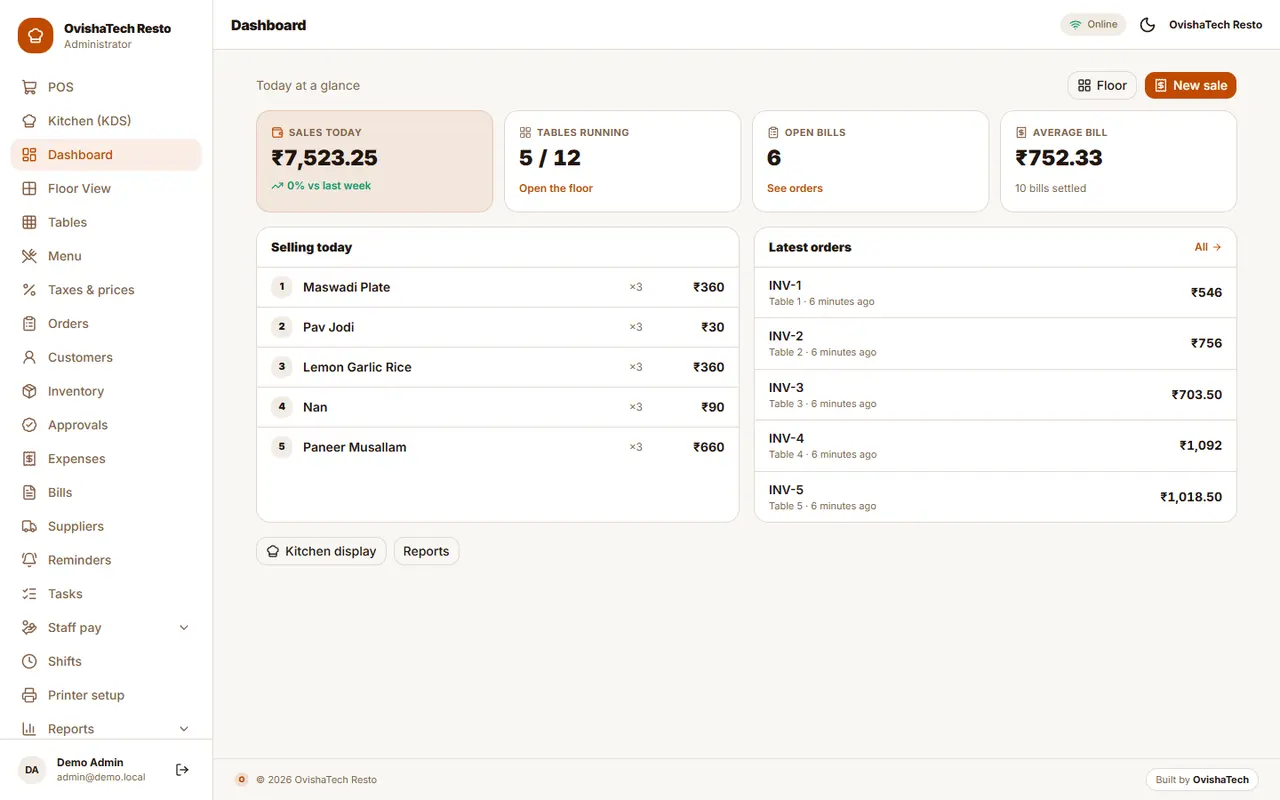
The dashboard shows today's sales, running tables, open bills and the average bill as they happen. Stock has reorder levels and a low-stock warning, supplier bills and statements show what is owed, and 21 reports cover sales, money, tax and what to watch.
Everything it does, by area
53 features in 9 areas, taken from what the system actually does today.
Billing and the till
The cashier's screen. Fast enough for a rush, strict enough that the books add up.
Dine-in, takeaway and delivery
Seat a table, ring up a counter sale, or take a delivery with the customer's address, landmark and delivery charge. Delivery orders can name the delivery partner and keep the partner's own order number.
Menu search and categories
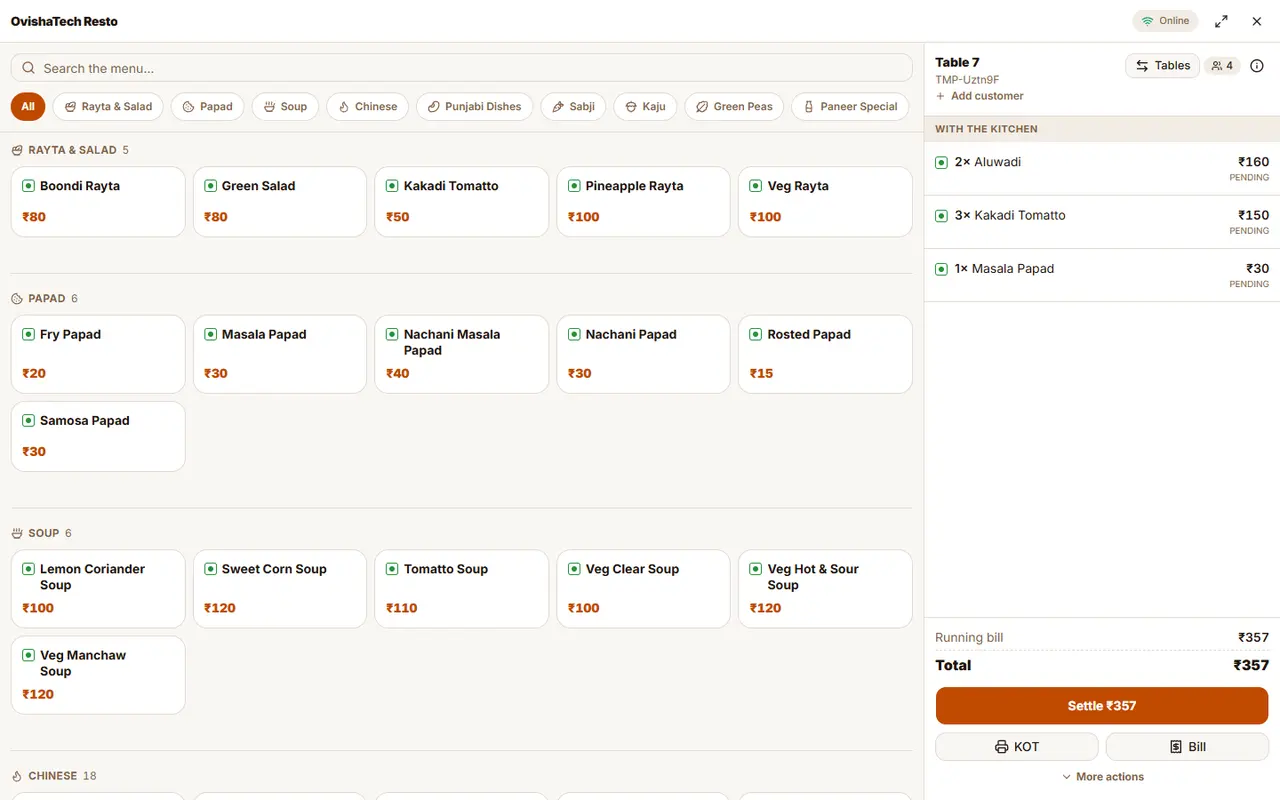
Search for a dish by name or code, or move through category chips. The running bill stays beside the menu, with Settle, KOT and Bill buttons always in reach.
Variants, add-ons and notes
A dish can have sizes or variants and optional add-ons, and each line can carry a note for the kitchen.
Hold and fire
Order the mains now and hold them until the starters are done. Held dishes are fired later as their own kitchen ticket.
Merge, move and split
Merge tables into one bill, move a bill to another table, merge two bills, or split one bill between guests.
Discounts and several ways to pay
Preset discounts (5, 10, 15 and 20 percent, or any amount), then cash, UPI, card, credit or a split of several methods on one bill. Cash payments take the amount tendered and show the change.
Customers on the bill
Attach a customer to a bill. Customers keep their order history and phone number, and a bill can be left on credit.
Voids with a reason
Cancelling a dish asks for a reason and is recorded with who did it. If the kitchen had already received it, the kitchen is told.
Payment proof and approvals
A payment can carry a photo of the proof. With payment control switched on, a manager approves or rejects payments from a queue.
Kitchen and floor
What the kitchen cooks and where every table stands.
Kitchen display
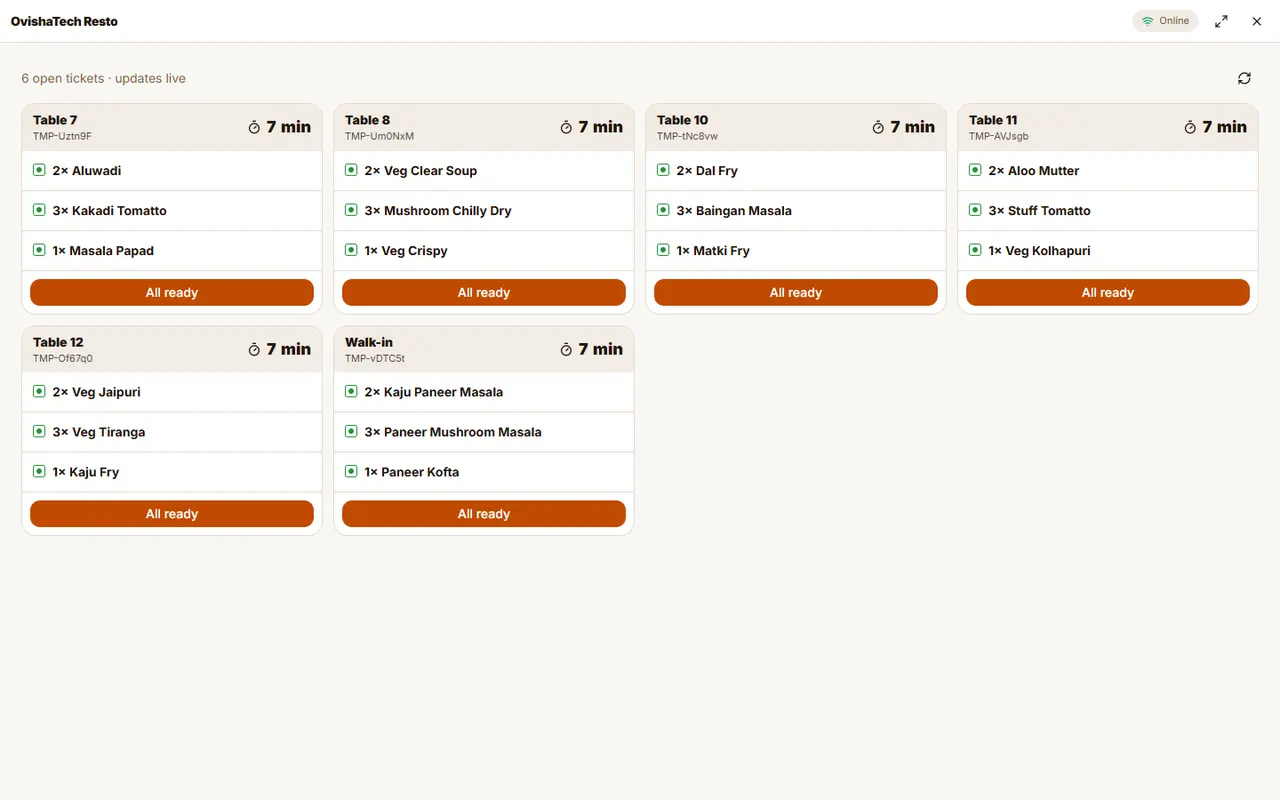
Open tickets by table with the dishes, quantities and elapsed time. Tick dishes off one by one, or mark the whole ticket ready. Tickets update live.
Kitchen tickets that print
Kitchen order tickets print on a thermal printer. A reprint is marked as a reprint, and a cancelled or changed dish prints its own ticket.
Floor view
Every table in one view: free, running, billed or held, with seats, covers, the amount running and the waiter who has it. Filter by floor or section.
Tables and sections
Set up floors and tables with their seat counts, hold a table for a guest with a note and a time, assign a waiter, and turn the QR menu on or off for each table.
Mark a dish unavailable
Take a dish off the menu for the day from the waiter's phone or the menu screen, so nobody sells what the kitchen has run out of.
Waiter app and QR menu
Order-taking that happens at the table, on the staff's own phones, and by the guests themselves.
Waiter app
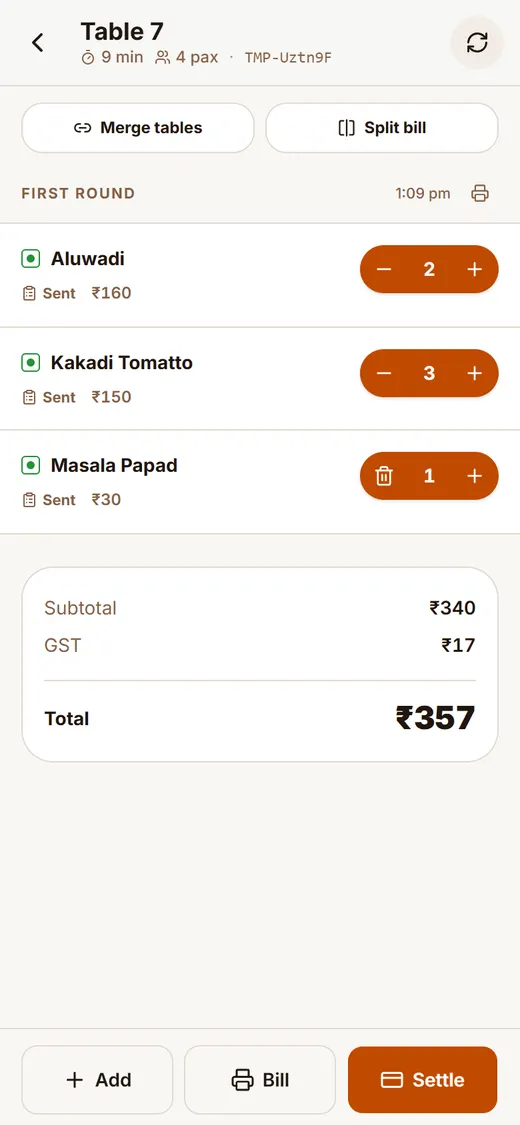
An installable phone app at its own address. A waiter signs in with a PIN, sees the floor and their own tables, opens a table, picks dishes and sends the round to the kitchen.
Quick picks and same again
The menu opens on the restaurant's best sellers of the last 30 days and the dishes already ordered on that bill, so a repeat round is one tap.
Settle from the table
Take cash, UPI or card at the table and open the receipt on the phone.
Works through a weak signal
The waiter app keeps its own offline copy of the floor and menu and tells the waiter when it is showing saved data.
My day
Each waiter sees their own sales for the shift, with cash, UPI and card totals, and can mark themselves present for the day.
Guest QR menu
Each table has a QR code. Guests browse the menu on their phone and, if the owner has switched it on, add dishes to a cart and place the order themselves. The owner can leave the menu up for browsing only.
GST, prices and printing
The rules a restaurant bills by, set once and applied everywhere.
GST by section and by dish
Set a rate for a menu section and every dish in it follows. A single dish can have its own rate or be marked GST-free. Each dish is taxed on its own value, and the rate is copied onto the bill line when the dish is ordered.
CGST and SGST on every bill
Printed and on-screen bills list CGST and SGST for each rate on the bill, with service charge, packaging and delivery handled alongside.
Prices by floor
Add a percentage to a section's prices on one floor (for example, an AC hall) or give a dish its own price on a floor. The till, the phone menu and the QR menu all follow.
Thermal bills and kitchen tickets
Bills and tickets are drawn for 58 mm and 80 mm thermal printers. The Android app prints over wifi, Bluetooth or USB, and the browser can print a bill too.
Several printers, one cash drawer
A device can print to more than one printer, with each printer handling only its own dishes, and can open the cash drawer when cash is taken.
Marathi and Hindi dish names
Thermal printers cannot print Devanagari, so each dish has an optional print name in English letters. The ticket never prints a blank line.
Scan-to-pay UPI code on the bill
Unpaid bills print a UPI QR code for the amount still due, into the restaurant's default UPI account.
DUPLICATE and REPRINT marks
A bill printed twice says DUPLICATE and a kitchen ticket printed again says REPRINT, so a copy is never mistaken for the original.
Stock, suppliers and expenses
What goes into the kitchen and what it costs.
Ingredients and stock levels
Track each ingredient in its own unit, with a reorder level, a cost per unit and a supplier. A low-stock warning shows what to buy, and stock can be adjusted with a reason.
Suppliers and bills
Record supplier bills and payments, and see what is outstanding, overdue and settled, per supplier.
Supplier statements and WhatsApp reminders
Create a PDF statement for a supplier and send payment reminders on WhatsApp. Reminders can follow a schedule.
Bill scan
Photograph a supplier's bill and the system reads it into a bill record. Available when the shop has an AI key set up on the server.
Expenses
Record day-to-day expenses under categories and see them against sales in the profit and loss report.
Tasks
To-do lists with My Day, planned and important views. A manager can give a task to one or several staff, repeating tasks come back on schedule, and reminders can be set.
Cash, shifts and staff
Controls that keep cash honest and people accountable.
Shifts with a cash count
Open a shift with the drawer's opening count and close it with the closing count. A close slip prints with the totals, and cash differences are reported.
Cash handovers
Record when a waiter hands cash to the cashier, so each person's cash position is known.
Five roles
Admin, manager, cashier, waiter and kitchen, each with their own screens and permissions. Staff sign in with a four-digit PIN or a password.
Attendance, advances and salary
Mark attendance, record advances and salary payments, and see a salary sheet. Monthly and daily pay rates are both supported.
Activity trail
Sign-ins, bill openings, kitchen sends and other actions are logged with who did them and from which device, with flagged events highlighted.
Orders only from the shop's network
The owner can limit order-taking to requests that come from the shop's own network address.
Reports
Twenty-one reports, in plain words, with a date range and a comparison to the period before.
Sales
Day summary, daily sales, sales channels (dine-in, takeaway, each delivery partner), hourly sales, product mix, menu engineering, food cost, waiter performance and customer history.
Money
Payments by method, cash reconciliation, cash differences, profit and loss, and the vendor ledger.
Tax
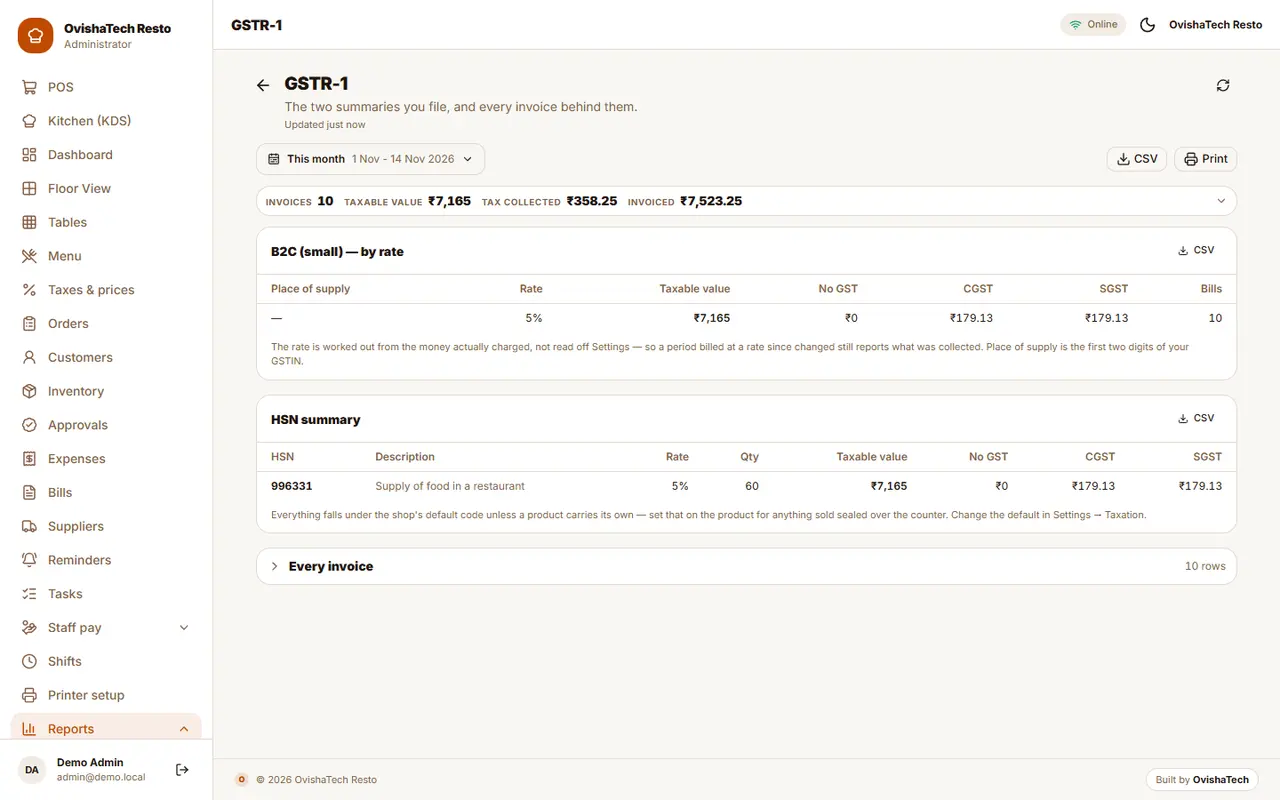
GSTR-1 (the B2C summary by rate, the HSN summary and every invoice) and a tax summary.
Watch closely
Discounts given, cancellations, kitchen turnaround time, table turnover and inventory movement.
Print, CSV and WhatsApp
Every report can be printed, downloaded as CSV or shared on WhatsApp, and frequent ones can be starred to the top.
Platform
How it is delivered and kept under the owner's control.
Installs like an app
The dashboard and the waiter app both install to the home screen from the browser, each with its own icon. The Android phone app adds direct printing and alerts with sound.
Live updates
Floor, kitchen and bills update across devices as things happen.
Light and dark theme
A theme toggle suits a bright counter and a dim dining room alike.
Your brand, your modules
Carries the restaurant's name, logo and brand colour. Modules (tables, QR menu, inventory, shifts, payables, bill scan, staff pay, reports, tasks) can be switched on or off, and the product can be set up in basic, pro and premium bundles.
Backups and data tools
Back up the data and import or export records from the settings screens.
See it working
The screens that matter most, from the running system with sample data. Tap a picture to open it full size.
On a computer
On a phone
What it is built with
Server
- Laravel 12 (PHP 8.2+)
- Laravel Sanctum token sign-in
- SQLite database by default
- Server-sent events for live updates
- mPDF for supplier statements
- ESC/POS rendering for thermal printers
Web apps
- React 19 and TypeScript
- Vite and Tailwind CSS v4
- base-ui components
- React Router
- Recharts for the report charts
- Installable PWA (dashboard and waiter app)
Phone app
- Expo and React Native (Android)
- Direct printing over wifi, Bluetooth and USB
- Offline queue for orders
- Local notifications with sound
Integrations
- UPI payment QR on bills
- WhatsApp sharing for reports and supplier reminders
- AI bill scan through the Anthropic API
Who uses it day to day
Restaurant owners
See the day as it happens, and find out where money and stock went without waiting for a month-end.
Managers and cashiers
Bill quickly, settle in any mix of payments, count cash by shift, and approve what needs approving.
Waiters
Take orders at the table on a phone, know which tables are theirs, and settle without walking to the counter.
Kitchen staff
A screen that shows what to cook, in order, and says when something changes.
Guests
Browse the menu on their own phone from a QR code on the table.
Want to see it yourself?
Want a system like this for your business?
A free 30-minute call with the founders. You keep the written proposal either way.